Краткое содержание
- High demand, low satisfaction: A recent survey found 73% of students call reliable dorm Wi-Fi “essential,” yet only 26% are very satisfied[1]. In fact, 84% say poor internet hurt their schoolwork[2]. Campuses are under enormous pressure to deliver fast, always-on connectivity.
- Devices and usage are exploding: The average student now has ~3.5 internet-capable devices[3] и 99% expect to connect at least two at once. Late-night streaming (midnight–6 AM) is the norm[4], pushing dorm networks to the limit.
- Plan for peak, not average: Networks must handle bursts – evenings, exams, events – not just a quiet day. Real-world data show bandwidth needs doubling every few years. For example, Cisco reports only 19% of networks use modern Wi-Fi (6/6E/7), leaving many unable to scale[5].
- Smart upgrades pay off: Prioritize critical traffic (online classes over games), upgrade Wi-Fi hardware (Wi-Fi 6/6E/7) for more capacity, add caching/CDN for popular content, and use real-time monitoring to spot bottlenecks.
- Quick planning guide: We include simple example calcs – a 2,000-student campus may need ~5 Gbps; a 10,000-student campus ~18 Gbps; 30,000 students ~52 Gbps – based on reasonable assumptions (see table below). Planning around these numbers – with 20–30% headroom – helps avoid the common “internet jam.”
- Bottom line: Treat campus internet like essential infrastructure. Build capacity, update Wi-Fi, and manage traffic. A slow network doesn’t just frustrate students – it holds learning and research back.

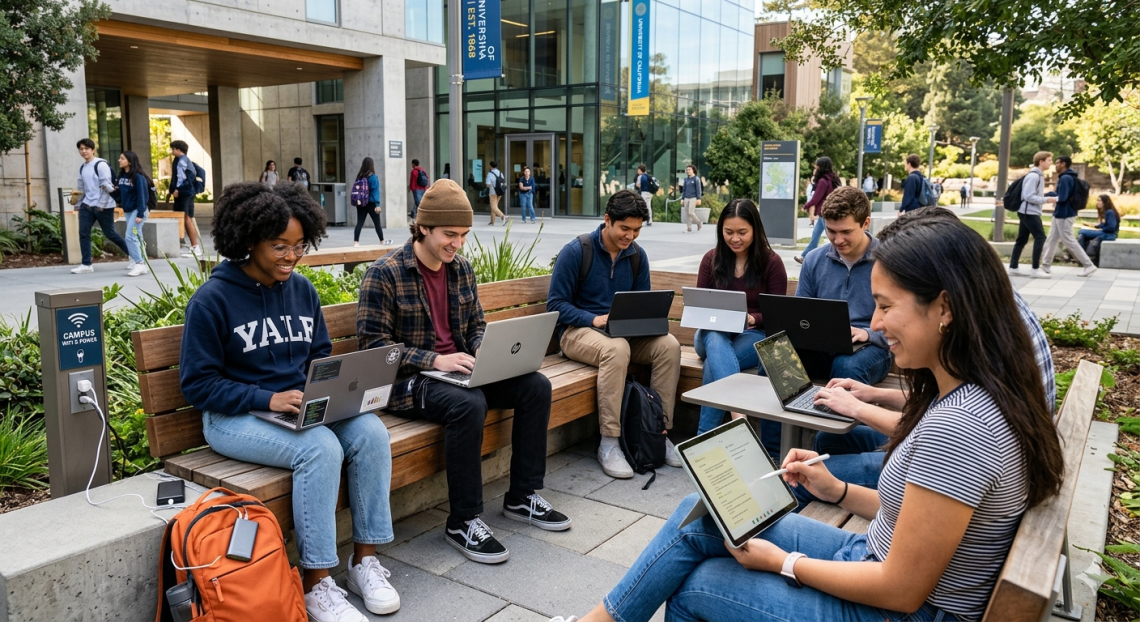
Figure: Students on a college campus rely on Wi-Fi for learning and life. (Photo credit: Getty)
Why Campus Internet Matters
Campus Wi-Fi is no longer optional. Today’s students expect always-on connectivity everywhere – dorms, classrooms, cafes. They stream lectures and experiments, video-call study groups, submit cloud-based assignments, and even use campus-building systems (like smart lighting or keyless entry) that require Wi-Fi. In a 2025 survey, nearly all (99%) of students living on campus agreed reliable internet is important, with 84% calling it as essential as safety and academic quality[6]. In fact, 84% say poor Wi-Fi has negatively affected their schoolwork[2], and 86% of campus staff report job disruptions due to connectivity issues[2].
Meanwhile, the bandwidth demand keeps soaring. By one estimate, over 22 billion devices were connecting via Wi-Fi globally by 2021[7], and the number climbs every year. As the Cisco State of Wireless report notes, very few organizations have upgraded their infrastructure (just 19% use the latest Wi-Fi tech[5]), so many campuses are scrambling to catch up. In short: a slow or overloaded network isn’t just an annoyance – it can derail teaching, research, and campus life.
The Bandwidth vs. Speed Reality
It helps to clarify bandwidth versus speed. Bandwidth is like the width of a highway: more lanes let more cars (data) through at once. A larger pipe doesn’t make one car go faster, but it lets many cars travel in parallel without traffic jams. On campus, adding bandwidth means more students can stream or download simultaneously. But if usage spikes higher than capacity, “traffic jams” (buffering, drops) happen no matter how fast each lane is.
In practical terms, check not just your peak bandwidth (e.g. an 10 Gbps internet link), but also your internal network capacity (switch uplinks, Wi-Fi backhaul) and distribution (Wi-Fi access points per building). Without careful planning, adding a bigger internet pipe alone won’t fix a crowded dorm Wi-Fi or an overloaded classroom.
Key Factors Driving Campus Bandwidth Demand
Several campus-specific factors drive high bandwidth needs:
- Device Explosion: Modern students juggle smartphones, laptops, tablets, gaming consoles, e-readers, and wearables. In a recent survey, nearly all students (99%) had a phone and 94% a laptop, bringing an average of 3.5 devices each to their dorm rooms[3]. Almost everyone expects to connect at least two devices at once, and 23% want four or more connected simultaneously[3]. That’s thousands of devices online every evening on a mid-sized campus.
Figure: An infographic from industry data shows how bandwidth use is split by device on campus. (Desktops and notebooks dominate, but smartphones and gaming devices also add up.)
- Peak Usage Patterns: Usage isn’t uniform. Boldyn Networks found dorm Wi-Fi peaks between midnight and 6 AM, when students stream video and work on assignments late into the night[4]. By contrast, daytime office hours (8 AM–12 PM) see much lower dorm usage. Lectures and labs create spikes too – picture hundreds of students in a big hall joining a Zoom lecture after lunch, or downloading a video simultaneously. Seasonal peaks (midterms/finals and online exam weeks) can double or triple normal loads. Good planning means provisioning for these peaks, not just average daily use.
- Bandwidth-Hungry Activities: Today’s college activities are very data-intensive. Streaming HD/4K video, cloud-based VR labs, and large software downloads are common. According to survey data, 95% of dorm students stream videos from their rooms and 75% play online games[8]. Even non-residential students use campus Wi-Fi for schoolwork (97%), social media (86%), and increasingly for video calls or streaming between classes[9][10]. In large campus venues (stadiums, auditoriums), over 37% of students reported Wi-Fi problems due to crowd usage[11]. All this means a lot of bits moving around – often all at once.
- Infrastructure Limits: Older networks struggle with density. Concrete walls, large lecture halls, and wide outdoor quads can all weaken signals. Many campuses originally built networks for wired labs, not BYOD wireless. If there are dead zones or only one access point covering a whole dorm floor, performance will plummet under load. Also, outdated hardware (10/100 ports, old wireless standards) caps capacity. Cisco warns that legacy Wi-Fi (pre–Wi-Fi6) simply can’t handle today’s device count[5].
- Rapid Growth: Bandwidth needs tend to grow 20–30% per year on busy campuses. User expectations also rise – if students see 1 Gbps home internet advertised, they quickly expect similarly fast Wi-Fi at school. Without regular upgrades, a network that was fine two years ago is often inadequate today.
Managing and Optimizing Campus Wi-Fi
Simply buying more bandwidth helps, but smart strategies multiply its impact. Key recommendations:
- Prioritize Academic Traffic: Use Quality of Service (QoS) rules or separate networks/VLANs to ensure critical educational traffic (online classes, research databases, campus apps) gets priority over recreational use. For example, limit streaming services or throttle massive downloads during peak hours, or put them on a secondary “guest” network. This way, an all-night gaming session by a few students won’t clog the lanes needed for a live lecture.
- Upgrade Wi-Fi Tech: Modern Wi-Fi standards (Wi-Fi 6, 6E, and now 7) offer far higher capacity and more concurrent connections. These support wider channels and better handling of dense device environments. Cisco notes that organizations switching to Wi-Fi 6E/7 report improved capacity, increased bandwidth, and enhanced scalability over legacy systems[12]. Upgrade access points to enterprise-grade units with multi-gig uplinks, add more APs in high-density zones (dorm common areas, study lounges, lecture halls), and consider adding small cells or distributed antenna systems in tough areas. Also ensure your core switches and uplinks can handle 2.5–10 Gbps to each AP for maximum throughput.
- Real-Time Monitoring: You can’t manage what you don’t measure. Use network analytics tools to track peak usage times, top bandwidth consumers (sites/apps), and weak coverage spots. Many campuses now deploy dashboards that show AP load, client counts, and roaming patterns live. This data lets IT staff preempt issues: e.g., if you see traffic jumping to video at 8 PM in Dorm A, you can throttle non-essential traffic or schedule upgrades before problems occur. (Even AI-driven tools are emerging to auto-tune networks based on observed patterns[13].)
- Use Caching and Local Content Delivery: For commonly-used content – like learning video libraries, operating system updates, or cloud services – set up local caches or content delivery. Many universities use local caching servers (or cloud proxies) for video and software updates to avoid hitting external internet links for every student request. Content Delivery Network (CDN) services can also be leveraged: for example, Azure/AWS/GCP PoPs or a campus CDN to serve campus websites and materials. This keeps internal traffic off your internet uplink.
- Staffing & Support: Remember that peak usage often occurs late nights. Boldyn’s research found that student Wi-Fi needs (midnight crunch-time) misalign with typical 9–5 IT staffing[4]. Consider 24/7 network monitoring or on-call support, or partner with a managed services provider, to ensure issues can be addressed when students need help most.
Planning Campus Upgrades: A Flowchart
The decision to upgrade your network follows a logical flow. Below is a simplified flowchart illustrating key steps:
flowchart LR
    A[Assess current network usage] --> B{Peak demand OK?}
    B -- "Yes (e.g. <70% utilization)" --> C[Optimize traffic (QoS, caching) and monitor]
    B -- "No (utilization high)" --> D{Budget for upgrade?}
    D -- "Yes" --> E[Increase bandwidth and upgrade Wi-Fi hardware]
    D -- "No" --> F[Apply interim fixes (user limits, time-based controls)]
    E --> G[Re-assess performance]
    F --> G
    C --> G[End: Continue monitoring]
    G --> H{Still issues?}
    H -- "Yes" --> A
    H -- "No" --> I[Maintain and review periodically]
This flowchart shows how to approach upgrades: start by measuring (A), check if peak load exceeds healthy thresholds (B). If current capacity is sufficient, focus on optimization. If not, review budget (D). If funding allows, add bandwidth/APs (E); if not, use stop-gap measures (F) like throttle P2P/gaming or restrict high-bandwidth services. After changes, retest performance (G). Then iterate (H).
Example Calculations: Bandwidth for Different Campus Sizes
To put numbers to this, here are rough example calculations. We assume peak usage scenarios (evenings in dorms/common spaces) with these handy figures:
- Streaming HD video: ~5 Mbps per stream
- Video conferencing: ~2 Mbps per call
- Web browsing/other: ~0.5 Mbps per active user
Using these, estimated peak needs are:
| Campus Size | Students | Estimated Devices (3.5 per student) | Streaming (@5 Mbps) | Video Calls (@2 Mbps) | Browsing (@0.5 Mbps) | Total (Gbps) | Recommended Bandwidth |
| Small | 2,000 | ~7,000 devices | 400 streams ≈ 2.0 Gbps | 200 calls ≈ 0.4 Gbps | 1,000 users ≈ 0.5 Gbps | 2.9 Gbps | ~5 Gbps |
| Medium | 10,000 | ~35,000 devices | 2,000 streams ≈ 10 Gbps | 1,000 calls ≈ 2.0 Gbps | 5,000 users ≈ 2.5 Gbps | 14.5 Gbps | ~18 Gbps |
| Large | 30,000 | ~105,000 devices | 6,000 streams ≈ 30 Gbps | 3,000 calls ≈ 6.0 Gbps | 15,000 users ≈ 7.5 Gbps | 43.5 Gbps | ~52 Gbps |
- How this works: For 2,000 students, if ~20% (400) are streaming HD and 10% (200) on video calls during peak, plus 50% (1,000) casually browsing, the sum is ~2.9 Gbps. Add ~20–30% headroom for overhead (retransmissions, growth, etc.), and you’d target ~5 Gbps of internet bandwidth. Scale similarly for 10k or 30k students.
- Caveats: These are illustrative. Real needs vary by campus culture (e.g. gaming-heavy vs. textbook-heavy) and BYOD trends. Always measure your own usage and add safety margin.
At Last: Future-Proof Your Campus Network
Campus internet isn’t a “nice to have” – it’s as fundamental as heating or electricity. With student expectations sky-high and devices multiplying, failing to plan means constant firefighting. Use data (like the stats above) to build a business case: students and staff both see fast, reliable Wi-Fi as mission-critical infrastructure[2].
Action steps: Audit your current usage (tools and reports), consult stakeholders (res life, faculty), and make a phased plan: immediate fixes (QoS, monitoring), mid-term upgrades (Wi-Fi 6E, new APs), and long-term capacity growth (multi-gig fiber or 5G). Keep communication open: students notice and appreciate when schools invest in connectivity.
The campus network of tomorrow will support AI tools, VR classrooms, and IoT at scale. Start building that highway today – one capable of carrying the growth that’s already on its way.
Sources: Recent industry reports (Boldyn Networks, EDUCAUSE, Cisco) and public data were used. Key stats above come from Boldyn’s 2025 Campus Connectivity survey[1][8] and Cisco’s 2026 Wi-Fi report[5], among others. All figures are up-to-date as of 2025.
[1] [2] [11] 2025 Campus Connectivity Report | Boldyn Networks
[4] [6] Rethinking Campus Connectivity | EDUCAUSE Review
https://er.educause.edu/articles/sponsored/2025/5/rethinking-campus-connectivity
[5] [12] [13] Breaking the wireless AI paradox: Turning challenges into competitive advantage – Cisco Blogs
[7] Wi-Fi: Unleashing the Next Generation Connected Experiences





 EN
EN  RU
RU  ES
ES  KO
KO  FR
FR  JA
JA  DE
DE